

How to Validate Email Addresses: A Practical Guide
Validating an email address is more than just a quick check. It's a layered process, starting with simple syntax and moving all the way to verifying if an inbox actually exists. This whole process is about making sure you're talking to real people. Filtering out the junk—the typos, the fakes, the abandoned accounts—is non-negotiable for protecting your sender reputation and getting the most out of every campaign you send.
Why Smart Email Validation Is a Business Imperative

If you think a few bounced emails are no big deal, it's time to look at the bigger picture. Poor email list hygiene isn't just a minor technical issue; it's a silent killer of your marketing budget and a genuine threat to your brand's reputation. A "dirty" list tells Internet Service Providers (ISPs) that you aren't a careful sender, and that can get your messages throttled or blocked. In fact, a bounce rate over 2% is a red flag for most ISPs like Gmail and Outlook.
Every time you send an email to an address that doesn't exist, your sender reputation takes a small hit. Do it enough, and those hits add up. Before you know it, your perfectly crafted emails are landing in the spam folder, invisible to the customers who actually want to hear from you.
The Hidden Costs of a Bad Email List
A messy list does more than just waste money on emails that go nowhere—it completely corrupts your data. When your analytics are based on a list full of duds, you can't trust them. You end up making strategic decisions based on a skewed reality, misinterpreting engagement and chasing phantom leads.
Imagine launching a huge product campaign to a list of 100,000 subscribers. If an industry-average 22.86% of your email list degrades annually and you haven't cleaned it, you could be sending over 22,000 emails into the void. This not only wastes budget but also means your open rates and click-through rates will be artificially low, making a solid campaign look like a total flop.
An unhealthy email list is like building a house on a shaky foundation. No matter how brilliant your marketing message is, it won't stand a chance if it can't reach its destination.
From Nuisance to Blacklist
Things can get serious, fast. High bounce rates are one of the biggest red flags for ISPs. If they see you consistently sending to bad addresses, they can blacklist your entire domain. Once that happens, even your critical transactional emails—like password resets or order confirmations—might not get through to your customers.
This changes the conversation completely. Making smart email validation a core part of your process is one of the most important lead generation best practices you can adopt. It’s about investing in quality from the very beginning.
Even with validation, the fight for the inbox is real. Research from 2023 shows that 15.8% of all emails globally end up in spam or go missing. While B2B delivery rates are often higher, some industries face bigger challenges. For SaaS companies, for example, inbox placement can drop to around 80.9%, which just underscores why you can never let your guard down.
At the end of the day, email validation isn't some tedious chore to check off a list. It's a fundamental strategy for protecting your marketing spend, maintaining your brand's good name, and making better decisions backed by clean, reliable data.
Starting with Foundational Email Address Checks
Before you dive into server handshakes or paid services, your first line of defense is right in front of you: the structure of the email address itself. This is your ground-zero check, often called syntax validation, and it’s surprisingly effective at weeding out the most basic typos and errors that mess up your contact lists.
Think of it like this: you wouldn't send a letter to an address that's missing a street name or zip code. The same logic applies here. An email address has a universally recognized format—local-part@domain—and anything that breaks this rule is dead on arrival. Getting this first step right prevents a huge chunk of your emails from bouncing before they even leave the gate.
Spotting Common Syntax Errors
Let's be honest, most bad email addresses aren't malicious; they're just typos. Someone rushing through a form, a slip of the finger—it happens all the time. If you know what to look for, you can catch these simple mistakes and clean up a significant portion of your data.
For instance, a valid email address can only have one @ symbol. No more, no less. That’s a simple rule, but it’s an instant giveaway.
Here are a few of the classic blunders you'll see over and over:
- The missing
@: An address likejanesmith.gmail.comjust won't work. - Spaces where they don't belong:
jane [email protected]is an invalid format. - Periods in the wrong place: You can't have an address like
[email protected]or[email protected]. - Funky characters in the domain: A domain like
gmail!.comis a no-go. Domains are restricted to letters, numbers, and hyphens.
You could try to spot these by hand, but that's not scalable. A much better approach is using a Regular Expression (regex). It's essentially a small script that defines the pattern of a valid email and can instantly flag anything that doesn't fit the mold. For example, a simple regex for email might look like this: ^[a-zA-Z0-9._%+-]+@[a-zA-Z0-9.-]+\.[a-zA-Z]{2,}$.
Verifying the Domain's Existence
Okay, so the email looks right. What's next? You need to check if the domain—the part after the @—is actually real and set up to handle email. This won't tell you if jane.smith exists, but it will confirm whether the gmail.com part of her address is legitimate by checking for its MX (Mail Exchange) records in the DNS.
A valid, email-ready domain is non-negotiable. If the domain itself is fake, misspelled, or just not configured for mail, then no address at that domain will ever work. Period.
This simple check is great for filtering out emails from defunct companies or, more commonly, ones with typos in the domain name (think [email protected] instead of gmail.com). For example, a quick check can instantly flag common misspellings like gnail.com or yaho.com.
While these initial checks are incredibly useful, they're really just the start. They lay the groundwork for the more advanced validation techniques we'll get into. If you're looking for a more automated, all-in-one solution, it's worth exploring some of the best email verification tools on the market that handle all of this and more.
Using SMTP Verification for Deeper Insights
So, you’ve run syntax and domain checks. That’s a great start—it weeds out the obvious typos and fake domains. But those checks can't answer the most critical question: does this specific mailbox actually exist?
To find that out, we need to go a level deeper. We’re going to simulate the first few steps of sending an email, a process known as SMTP verification.
Think of it as knocking on the door before you try to deliver a package. Your system reaches out to the recipient's mail server and politely asks, "Hey, I have a message for [email protected], can you accept it?" The server's reply gives you a definitive yes or no, all without sending a single email. This technique gives you a much higher degree of confidence than the basic checks ever could.
The Behind-the-Scenes Conversation
This whole process is really just a quick, scripted chat between your server and theirs, all guided by the Simple Mail Transfer Protocol (SMTP). It might sound technical, but the exchange is surprisingly logical.
Here’s how that conversation usually plays out:
- HELO/EHLO: Your system starts by introducing itself. It’s the server equivalent of, "Hello, my name is…"
- MAIL FROM: Next, it states where the "email" is coming from (e.g.,
MAIL FROM:<[email protected]>). - RCPT TO: This is the moment of truth. Your system presents the email address you're testing (e.g.,
RCPT TO:<[email protected]>) and asks the server if it’s a valid recipient.
The server's response to that final RCPT TO command is everything. A positive reply, typically a "250 OK" code, is your green light—the mailbox is valid and active. Anything else, such as a "550 No such user here" response, suggests the address is a dud.
This layered approach is a cornerstone of good email hygiene. In my experience, the most effective strategies always combine syntax checks, domain validation, and SMTP verification to get the highest accuracy and keep bounce rates down. You can find more practical tips for ensuring high delivery rates on mailfloss.com.
SMTP verification is the closest you can get to confirming an email address is real without hitting 'send.' It’s a powerful technique, but you have to be careful with it to avoid getting your IP address flagged.
Understanding the Limitations and Risks
SMTP verification seems like the perfect solution, right? Well, not so fast. It comes with some significant strings attached. Mail servers are constantly on guard against spam, and a flurry of verification checks can look suspiciously like a spammer trying to map out a network.
Because of this, many servers have built-in defenses:
- False Positives: Some servers use a "catch-all" configuration. To throw off spammers, they'll accept any email address you check, whether it exists or not. They essentially say "yes" to everything, which makes your verification attempt useless. An estimated 10-15% of business domains are configured this way.
- Greylisting and Blocking: If you fire off too many checks too quickly from the same IP, servers will often get suspicious. They might temporarily block you (greylisting) or block you outright, assuming you’re a bot.
These hurdles make DIY SMTP verification a tricky business. It’s often smarter and more reliable to use a professional service. They have the right infrastructure and sophisticated algorithms to run these checks without raising red flags and can correctly interpret the wide variety of responses servers send back.
Automating Validation at Scale with Third-Party APIs
Let's be realistic. While it’s great to understand the nuts and bolts of syntax checks and SMTP handshakes, these manual methods just aren’t practical when you're dealing with a list of thousands, let alone millions, of email addresses. It's slow, incredibly complex to manage, and you run a very real risk of getting your own IP address blacklisted.
This is exactly where third-party email validation APIs come into play. They are the professional-grade solution for this problem.
These services do all the heavy lifting for you. They package every complex check—from syntax and domain lookups to the tricky SMTP handshake—into one clean API call. Instead of wrestling with your own convoluted verification system, you just send an email address to the service and get a clear, detailed result back in moments. For any business serious about data quality, it’s the only way to go.
The Power of Specialized Intelligence
The real magic of a dedicated API isn't just about speed; it's about the deep intelligence they bring to the table. These platforms have been at this for years, constantly refining their algorithms and amassing enormous datasets. The result is a level of insight that's virtually impossible to build from scratch.
A good validation API can spot things you'd never catch on your own:
- Disposable addresses: Think temporary emails from services like Mailinator or Guerilla Mail, often used by people trying to game a free trial. These can account for up to 6% of new signups on some platforms.
- Role-based accounts: Addresses like
[email protected]or[email protected]. These aren't necessarily "bad," but they often have low engagement and are shared among multiple people. - Catch-all domains: These are servers set up to accept email for any address at that domain, which makes a standard SMTP check pretty much useless.
- Spam traps: These are the landmines of email marketing—addresses used by ISPs specifically to identify and block spammers. Hitting one can wreck your sender reputation.
This kind of detailed analysis changes everything. You're not just cleaning your list; you're enriching it with data that helps you better segment your audience and, most importantly, protect your all-important sender score. Many top-tier lead generation automation tools even come with these validation services built right in, which makes the whole process seamless.
How API Integration Works in Practice
Getting an email validation API hooked into your system is usually surprisingly painless. Most providers have excellent documentation, and the whole thing typically boils down to making a simple HTTP request that includes the email you want to check and your private API key.
For example, say you need to verify [email protected]. Your application would send a request to the API provider. The service then runs its battery of tests behind the scenes and shoots back a structured response, usually in JSON format.
A typical response would give you everything you need to know:
{
  "address": "[email protected]",
  "status": "invalid",
  "sub_status": "mailbox_not_found",
  "domain": "notarealdomain.xyz",
  "is_disposable": false,
  "is_role_based": false,
  "is_catch_all": false
}
With a clear invalid status like that, your system can instantly and automatically block the address from ever entering your database. This is how you keep your list clean right from the point of capture.
This infographic breaks down the essential logic that these automated services use to make a "keep or remove" decision.
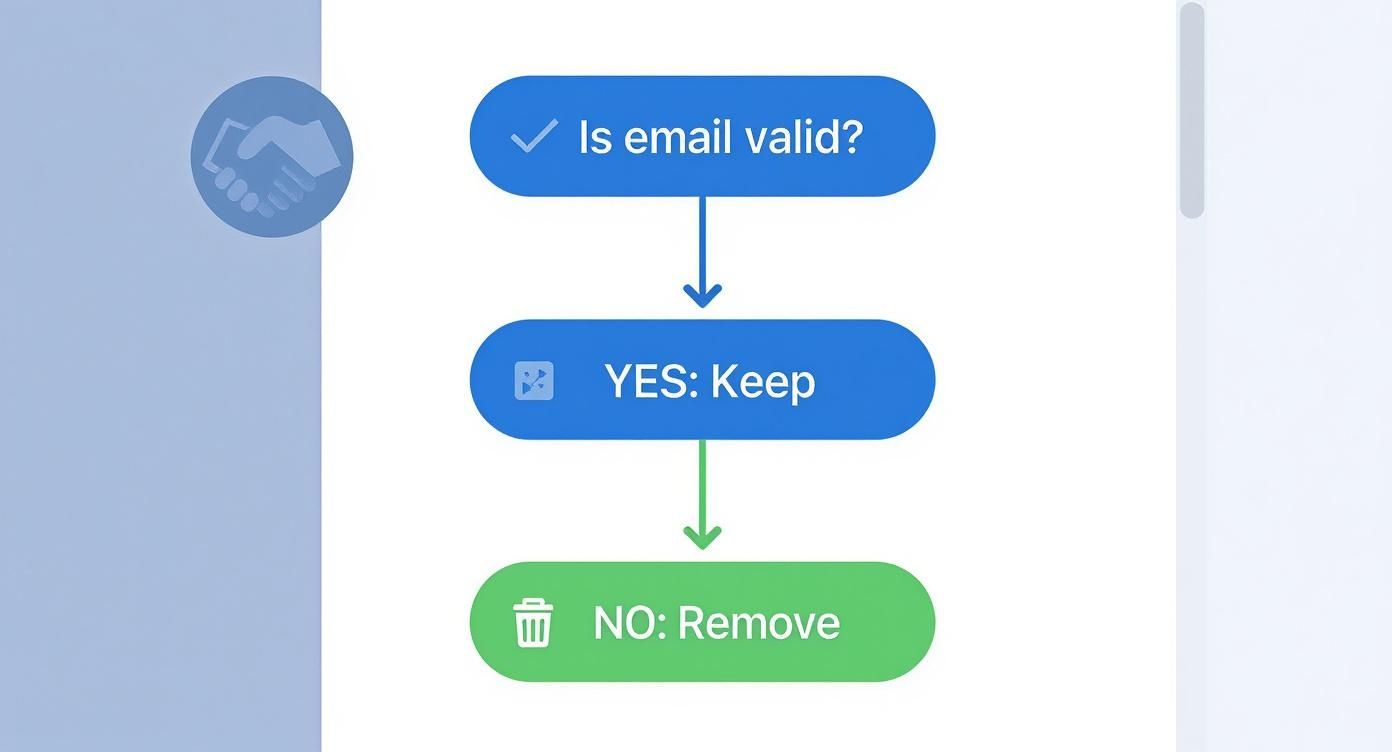
Think of the API as performing this handshake test on a massive scale, giving you a definitive verdict for every single email you process.
The demand for these tools is exploding for a reason. The email validation market is projected to more than double, growing from USD 1.1 billion in 2023 to about USD 2.5 billion by 2032, all because businesses are realizing how critical data quality is.
By outsourcing the heavy lifting to a specialized API, you're not just saving time. You're getting a faster, more accurate, and far more intelligent validation process. It effectively turns a potential technical nightmare into a simple, automated part of your data hygiene routine.
Building a Proactive Email Hygiene Strategy
Great email validation isn't a one-and-done task; it's an ongoing discipline that keeps your marketing engine humming. The real goal is to shift from frantic, reactive cleanups to a steady, proactive management style. This means weaving validation directly into your daily operations, not just scrambling when your bounce rates suddenly go through the roof.
The single most impactful place to start is with real-time validation. By hooking a validation API directly into your website's signup forms, you effectively put up a bouncer at the door. You can stop typos ([email protected]), fake addresses, and disposable emails from ever polluting your database in the first place, making sure every new contact is a solid one from the get-go.
Creating a Sustainable Workflow
Beyond capturing new leads, your existing list needs regular check-ups. Email lists degrade over time—it's just a fact. An estimated 22.5% of email addresses become invalid every year as people change jobs, switch providers, or simply abandon old accounts. That's why scheduling routine list cleaning is so critical for long-term health.
Here’s a simple, effective rhythm I’ve seen work wonders:
- Quarterly Bulk Cleaning: Every three or four months, run your entire email list through a trusted validation service. This is your chance to catch and remove any addresses that have gone dormant since your last check-in. For example, a marketing agency might run a client's list at the start of each fiscal quarter.
- Implement a Sunset Policy: It’s time to gracefully let go of subscribers who haven't opened or clicked on your emails in a while—say, 90-180 days. This isn't just about cleaning your list; it's about focusing your energy and budget on an audience that actually wants to hear from you.
This kind of consistent maintenance is the bedrock of a high-performing email program. If you want to get into the nuts and bolts of the technical side, our guide on how to improve email deliverability lays out more actionable steps to optimize your entire sending process.
A proactive email hygiene strategy does more than just clean up data. It's about safeguarding your sender reputation, boosting your campaign ROI, and cultivating a more engaged—and ultimately more profitable—audience over time.
Expanding Your Hygiene Practices
A truly comprehensive strategy also thinks about the security of your contacts' data. It's a crucial piece of the puzzle. For example, understanding how to check for email data breaches is a smart move. If a subscriber's email address has been compromised, it could eventually be used as a spam trap or become a risk to your list's integrity.
In the end, this proactive mindset turns email validation from a tedious chore into a powerful strategic asset. It keeps your list profitable, your sender reputation pristine, and your marketing messages landing where they belong. By adopting these practices, you're not just cleaning a list; you're building a sustainable foundation for truly successful email communication.
Frequently Asked Questions About Email Validation
Even with the best tools and a solid plan, you're bound to have some questions about email validation. That's perfectly normal. Getting the right answers can make all the difference, so let's clear up a few of the most common things people ask.
How Often Should I Validate My Email List?
This is a great question, and the answer has two parts.
For your existing email list, a good rule of thumb is to run a full bulk validation every three to four months. Data from HubSpot suggests that business email lists decay by about 22.5% annually. A quarterly cleanup helps you stay ahead of that natural degradation.
But for new signups, the answer is different: you need to validate them instantly. By using a real-time validation API on your signup forms, you can catch typos and bad email addresses before they ever contaminate your database. It's so much easier to prevent bad data from getting in than it is to clean it up later.
Can Email Validation Guarantee 100% Deliverability?
In a word, no. It's crucial to understand the distinction here. Email validation is about confirming an address is technically sound and can receive mail. It's a foundational step and dramatically boosts your chances of hitting the inbox. A clean list might achieve a 98-99% delivery rate (meaning the email was accepted by the server), but that's not the same as deliverability.
Deliverability, on the other hand, is about where the email lands—the inbox, spam folder, or promotions tab. It involves your sender reputation, the quality and relevance of your email content, and whether your recipients are actually engaging with what you send.
Think of it this way: validation confirms the mailing address is real. Deliverability is whether the mail carrier trusts you enough to actually put your letter in the mailbox. You absolutely need the first to have any shot at the second.
So, while it's not a magic bullet for 100% inbox placement, validation is easily the most impactful thing you can do to build a strong foundation for great deliverability.
What Is a Catch-All Email Address?
You've probably seen these flagged by a validation service. A "catch-all" is a special server setup where a domain accepts any email sent to it, no matter what comes before the @ symbol.
So, if company.com has a catch-all, emails to [email protected], [email protected], and [email protected] would all be accepted by the server, even if none of those specific mailboxes actually exist. They are common in smaller businesses that want to ensure they never miss an inquiry due to a typo.
A good validation tool can't confirm the individual user in these cases, so it will flag the address as "risky" or "catch-all." It's best to be cautious with these. Sending to them can be a gamble because they often go to an unmonitored inbox, which can drag down your engagement rates over time.
Ready to connect with high-intent prospects from recently funded startups? FundedIQ delivers hand-curated, validated lead lists directly to you, eliminating the guesswork and ensuring your outreach hits the mark every time. Start building your pipeline with accurate, actionable data today at https://funded.iq.